Nov 5, 2026 · 4 min read · MCP and AI memory
My PM Operating System, Eight Months Later
What changed after I built a personal operating system for PM work: the tasks moved to Jira, a one-screen Today view replaced the morning wall of text, and the system started fixing itself.
On this page · 5 sections
In March I built a PM operating system in one afternoon: one home for the work that’s mine (decisions, follow-ups, the person I owe a reply), separate from the work my team ships, with an AI assistant rebuilding the state of my day every morning.
The core idea held up. Almost everything around it changed. Here’s what, and what I’d tell another PM building their own.
The tasks moved to where my tools already were
Version 1 kept my tasks in a small database on my laptop. That was fine until I noticed what it couldn’t do. I couldn’t see my list from my phone. Nothing outside my code editor could read it. If the laptop died, the list went with it. And there was no history of when something changed state.
Jira already did all of that, and it was where my team’s work lived anyway. So in late May I moved everything over.
I did it the way you’d migrate anything that matters. For two days the system wrote every change to both places. A small script compared all 218 tasks, one by one, until both sides matched. Only then did I switch the old database off. Nothing was lost, and my daily routine never noticed.
The lesson: put your tasks where your other tools can already reach them. The cleverest storage is the one you don’t have to maintain.
The view mattered more than the storage
The second change was bigger, and it had nothing to do with where tasks live.
Every morning the assistant used to write me a long briefing: priorities, meetings, follow-ups, news. It was thorough, and by the third screen I’d stopped reading. The information was right; the format was wrong.
In October I replaced it with a single screen I call Today, open next to the chat all day:
- A day plan from the first task to a hard stop, with meetings and breaks already in place.
- Waiting on others, so I know who to nudge without digging.
- Coming up, with hard deadlines marked.
- Clashes this week across my work and personal calendars.
- Look finished? Tasks the system thinks are done, for me to confirm with one click rather than close by hand.
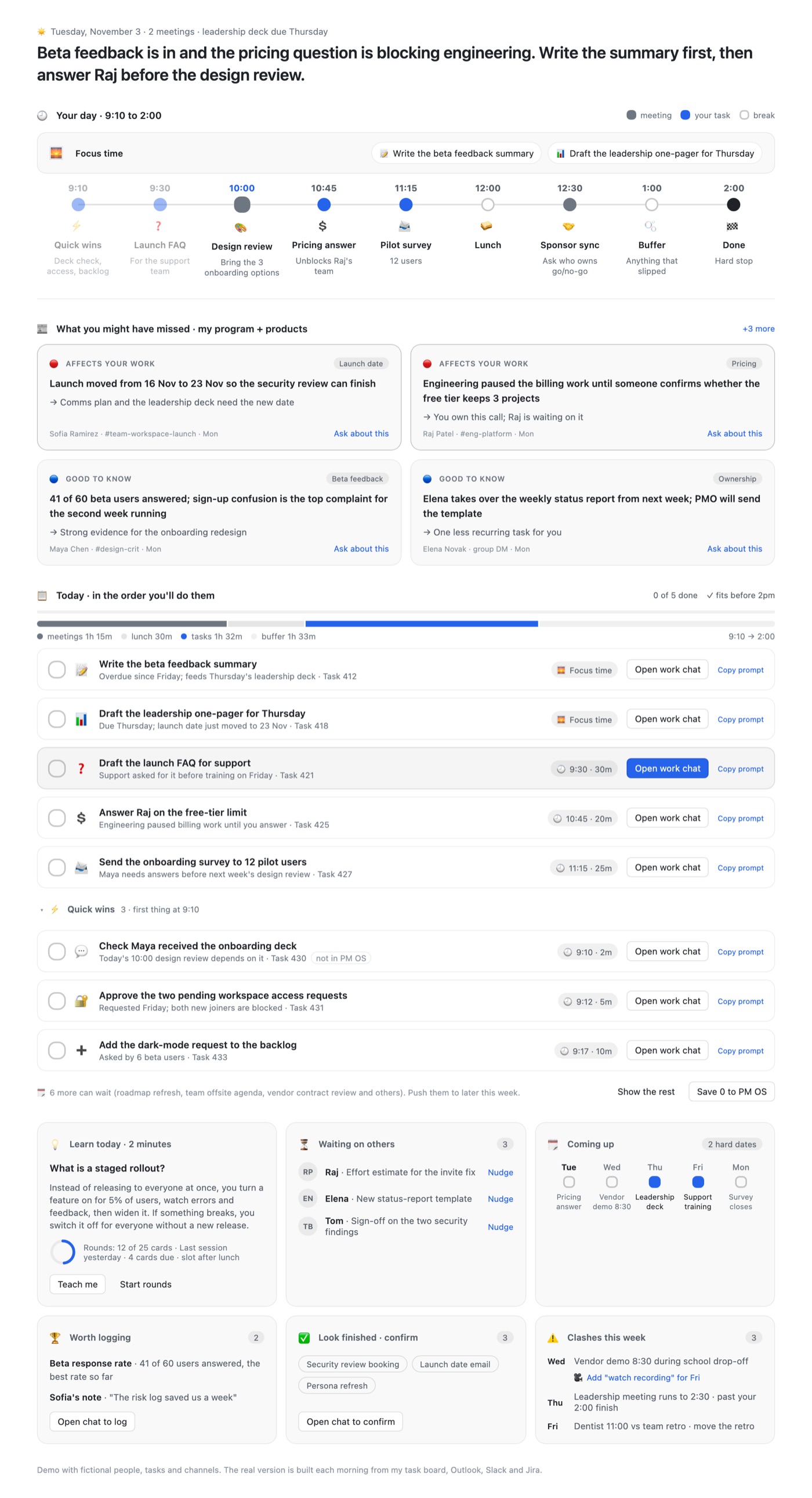
A demo version with made-up people and tasks. The real one is built each morning from my task board, calendar and Slack.
The morning chat shrank to a short control strip. When I want to work on something, I open it from the screen, and the chat starts with the full back story of that task: why it exists, what we decided, and what’s left.
The lesson: if you build one of these, spend your effort on the view, not the plumbing. A briefing you don’t finish reading is a briefing you didn’t get.
It survived a role change
In September I moved to a new role. New program, new people, new channels, and none of my old product areas.
I expected a rebuild. It took a day. The routines for my old products were parked rather than deleted, the new program got its own section, and the morning routine started reading different channels. Everything that wasn’t about the role itself — capture, priorities, the Today screen — carried over unchanged.
The lesson: separate the parts of your system that are about how you work from the parts that are about what you work on. The first kind should outlive any one role.
It reviews its own mistakes
The change I’m proudest of is the least visible. The system now watches where I correct it.
When I say “that’s not what I meant” or fix the same kind of thing twice, it logs the pattern. Every other Friday it reviews that log, plus its recent conversations with me, and proposes fixes. I pick at most three. Some become new standing rules: ask me one question at a time, with your recommendation, instead of five at once. Others fix a specific routine.
Forty-one fixes have gone through that loop so far. None of them was dramatic. Together, they’re the reason the system feels like it knows how I work instead of like a tool I have to manage.
The lesson: the most useful thing a personal system can learn is where it annoys you. Give it a way to notice, and a fixed, small budget for acting on it.
What I’d tell another PM
- Separate your work from your team’s work. This was the point of version 1, and it’s still the part that matters most.
- Store tasks somewhere your tools can already read. Don’t build storage.
- Make one screen you’ll actually look at. Then make it shorter.
- Plan for your role changing. It will.
- Let it learn from your corrections, three fixes at a time.
The system is still small. It just finally fits.